How to Prompt AI Video Like a Pro
Camera motions, cinematic styles, lighting techniques, and subject directions — the complete guide to getting professional results every time.
The Anatomy of a Perfect AI Video Prompt
Every great AI video prompt has four components working together. Think of it like directing a real film scene — you need to tell the model what's in the frame, how the camera moves, what the lighting looks like, and what the subject is doing.
The formula is: Subject + Action + Camera Movement + Lighting/Style
Most beginners only include the subject. That's why their results look flat. Here's the difference:
Every extra detail you add is a direction you're giving to the AI director. The more specific you are, the less the model has to guess — and guessing is where AI video goes wrong.
Camera Motion Techniques
Camera movement is the single most important element for making AI video look professional. A static shot with a great subject still looks like a photo. A moving camera transforms it into a cinematic experience.
PulseMotionHub's Image to Video and Text to Video tabs include built-in Camera Motion Presets you can apply with one click. Here's what each one does and when to use it:
| Camera Motion | What It Does | Best For | Prompt Keywords |
|---|---|---|---|
| Dolly Forward | Camera moves toward the subject smoothly | Portraits, product reveals, emotional moments | slow dolly forward, camera pushes in |
| Pull Back Reveal | Camera moves away, revealing the wider scene | Landscapes, establishing shots, epic reveals | camera slowly pulls back, wide reveal |
| Orbit / 360° | Camera circles around the subject | Products, sculptures, characters, animals | camera orbits around subject, 360 rotation |
| Pan Left / Right | Camera sweeps horizontally | Landscapes, cityscapes, following action | slow pan left, sweeping panoramic movement |
| Tilt Up | Camera tilts upward, dramatic reveal | Buildings, mountains, tall subjects | camera tilts up slowly, low angle to sky |
| Aerial Pull Back | Drone-style rising and pulling away | Cityscapes, nature, establishing scenes | aerial drone shot pulling up and back |
| Tracking Shot | Camera follows subject as they move | Walking scenes, action, following movement | tracking shot following subject, camera alongside |
| Handheld | Slight natural camera shake | Documentary, raw emotion, street scenes | handheld camera, natural movement, documentary style |
| Static Shot | Camera completely still | Product shots, portraits, controlled scenes | static shot, locked camera, no movement |
Combining Camera Motions
Advanced prompts combine camera motion with subject motion for more complex results. The key is to describe them separately and clearly:
Cinematic Styles & Aesthetics
Style keywords tell the AI the overall visual language of your video. These are the most powerful words for dramatically changing the look and feel of your output:
| Style Keyword | Visual Effect | Best Models |
|---|---|---|
| Cinematic | Film-like quality, natural color grading, depth | All models |
| Anamorphic lens | Wide horizontal lens flares, oval bokeh | Kling 3.0 Pro |
| Shallow depth of field | Sharp subject, blurred background | Kling, Hailuo |
| Film grain | Subtle texture, analog film feel | Kling 2.1, 3.0 |
| Slow motion | Dramatic time-stretched movement | Kling 3.0 Pro |
| 4K ultra detailed | Maximum sharpness and texture detail | Seedance 2.0 |
| Anime style | Cel-shaded, vibrant, Studio Ghibli aesthetic | Hailuo Live |
| Documentary | Natural, unpolished, real-world feel | Kling 2.1, Hailuo |
| Cyberpunk | Neon, rain, dark urban atmosphere | Kling 3.0, Seedance |
| National Geographic | Wildlife documentary realism | Kling 3.0 Pro |
Lighting Directions That Work
Lighting is what separates amateur AI video from cinematic AI video. The right lighting keyword changes the entire mood and perceived quality of a generation:
| Lighting Term | Effect | Best Use Case |
|---|---|---|
| Golden hour | Warm orange-gold tones, long shadows | Portraits, outdoor scenes, emotional moments |
| Blue hour | Cool blue twilight, soft even light | Urban scenes, moody portraits |
| Dramatic backlighting | Subject silhouetted or rim-lit from behind | Action, drama, powerful reveals |
| Soft diffused light | Even, flattering, no harsh shadows | Beauty, fashion, product shots |
| Neon lighting | Colored artificial light, high contrast | Night scenes, urban, cyberpunk |
| Candlelight / firelight | Warm flickering orange tones | Intimate scenes, historical content |
| Overcast / diffused sky | Flat even outdoor light, no shadows | Nature, wildlife, documentary |
| Studio lighting | Professional controlled light setup | Portraits, product videos |
| Moonlight | Cool silver-blue night lighting | Night scenes, fantasy, romance |
Subject & Action Directions
How you describe your subject's action determines whether your video has energy and life or feels static and dead. Even small motion details make a huge difference:
For People & Portraits
Always describe micro-movements — the small natural motions that make a person feel alive:
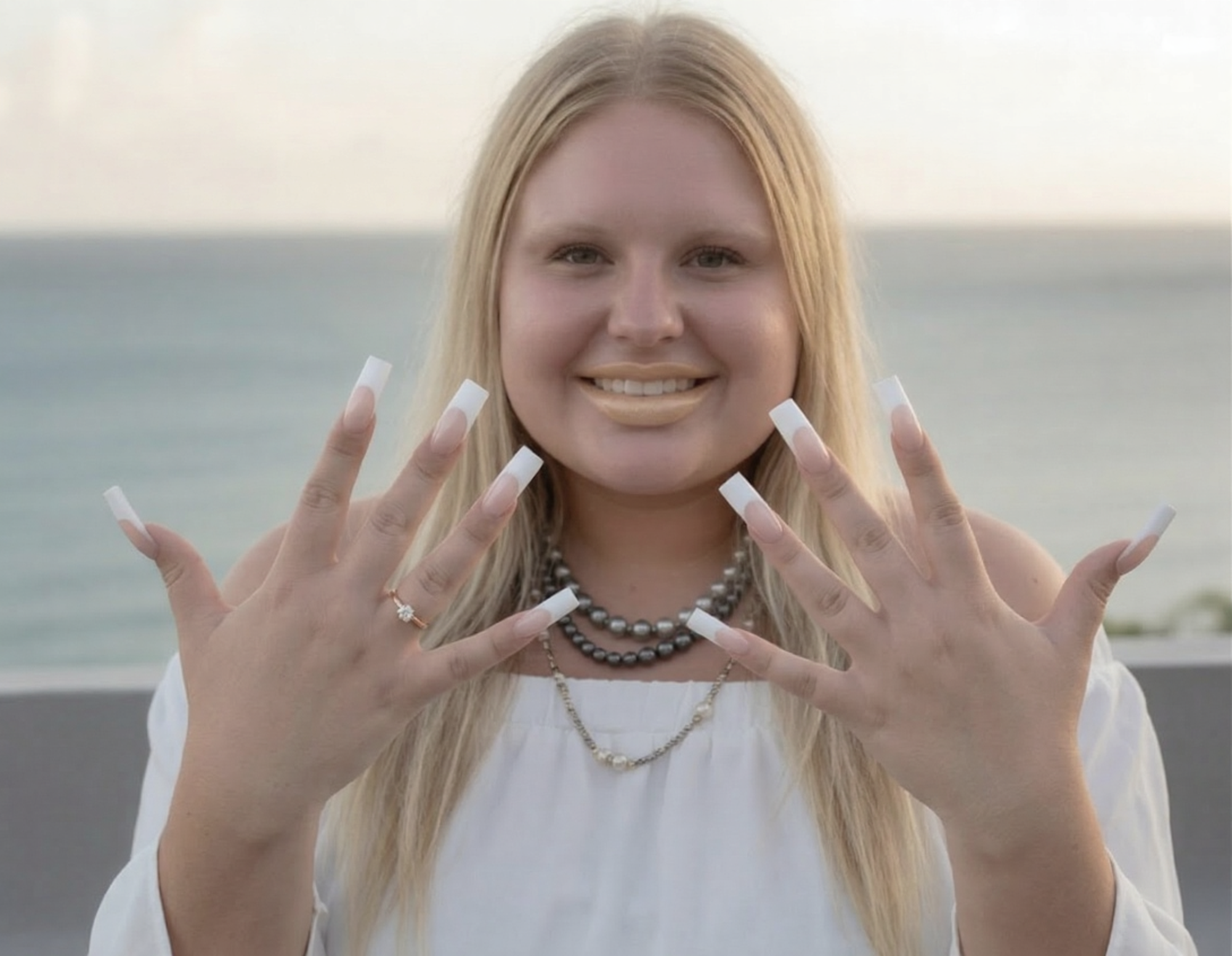
1. Subject action described first, specifically. "Waves with both hands and blows a kiss" tells the AI exactly which body parts move and how. Vague alternatives like "she moves" or "she reacts" produce inconsistent, unpredictable motion. The more specific the action, the more accurate the output.
2. Facial detail drives emotional realism. "Lips pursed" is a micro-movement instruction — it tells the model exactly what the face should do during the kiss gesture. Without this, the AI guesses and often produces a generic smile instead of the intended expression.
3. Lighting specified, not assumed. "Warm golden hour light on her face" locks in the color temperature and direction. Removing this phrase would let the model choose its own lighting — which may not match your source image at all.
4. Camera motion adds cinematic quality. "Camera slowly dollies forward" transforms what would be a static animated portrait into a moving cinematic moment. Even a subtle camera push-in creates emotional intimacy that a locked camera cannot achieve.
⚠️ What NOT to do: Do not describe what is already visible in the source image. The model can see the dress, the hair, the setting. Your prompt should describe only the motion — what moves, how it moves, and how the camera moves.
For Animals & Wildlife
Describe the animal's body language and physical state — this drives realistic motion:
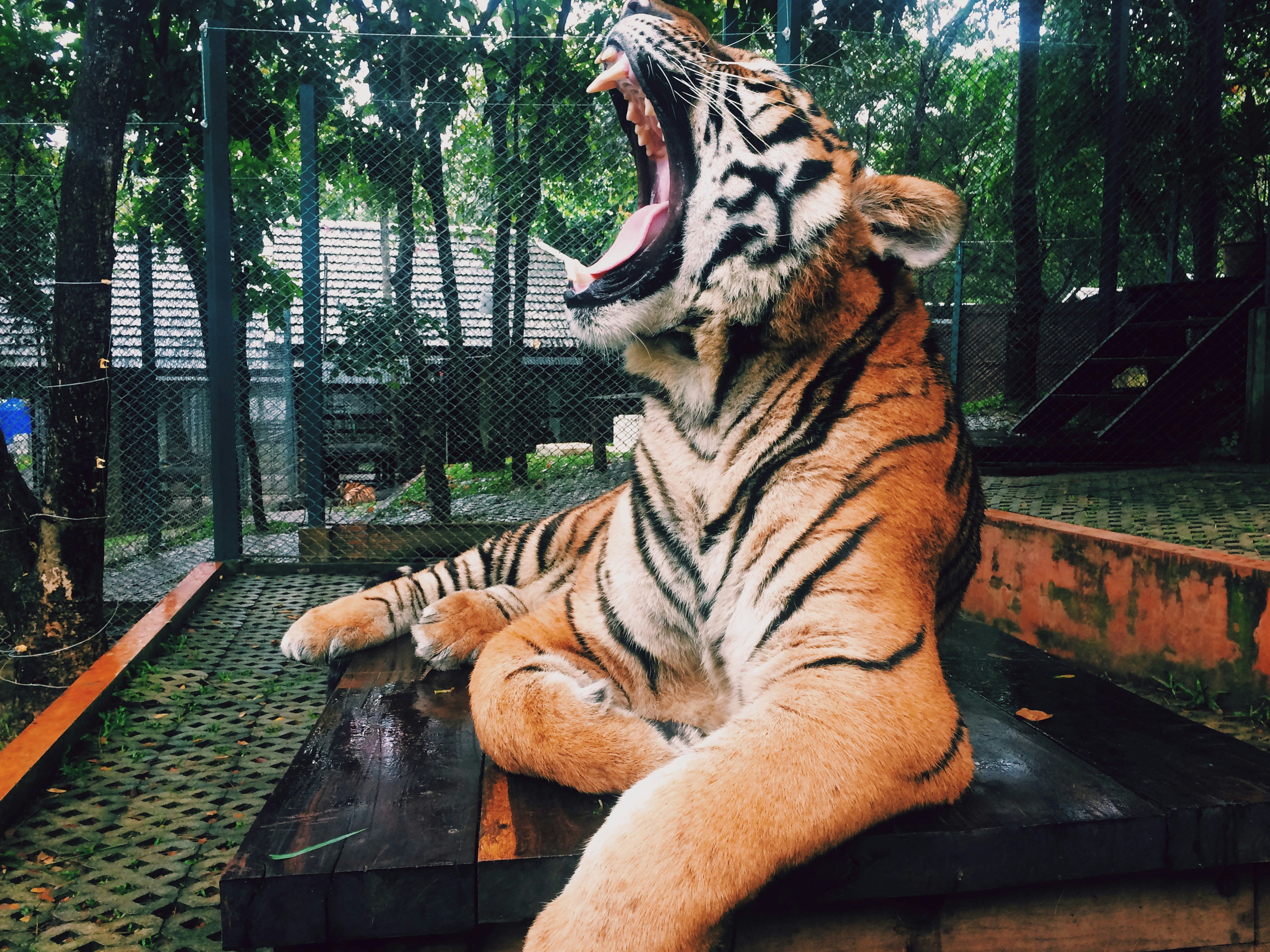
1. Sequential action description. "Opens mouth wide in a yawn, slowly closes jaw" describes the action as a sequence with a beginning and end. This gives the model a complete motion arc to animate rather than a single frozen gesture. For animals especially, describing the full movement cycle produces far more realistic results.
2. Secondary subject introduced mid-scene. "A zookeeper walks gently into frame from the right" tells the model to introduce a second character with directional information (from the right). Specifying the direction of entry prevents the model from guessing — and guessing incorrectly — where the new subject appears from.
3. Animal response behavior described explicitly. "Tiger responds naturally to the touch" is a behavioral instruction. Without it, the model might animate the tiger as completely static during the head rub. Describing how the animal should react to an interaction produces a far more believable scene.
4. Documentary style keywords unlock realism. "National Geographic style" and "wildlife documentary realism" are style anchors that pull the model toward naturalistic rendering rather than cinematic or stylized output. For animal content specifically, these keywords consistently improve physics accuracy and fur simulation quality.
5. Seedance 2.0 chosen for a reason. This scene required multiple interacting subjects, realistic fur simulation, natural lighting, and complex behavioral motion. Seedance 2.0 is the right model for this level of complexity — Kling would handle it, but Seedance's physics engine produces more believable weight and texture at this detail level.
⚠️ Key insight: Multi-subject scenes require you to describe each subject's behavior independently and in sequence. Think of yourself as a director writing a shot description — who does what, in what order, from which direction.
For Landscapes & Abstract
Describe the elements in motion within the scene — water, wind, light, particles:
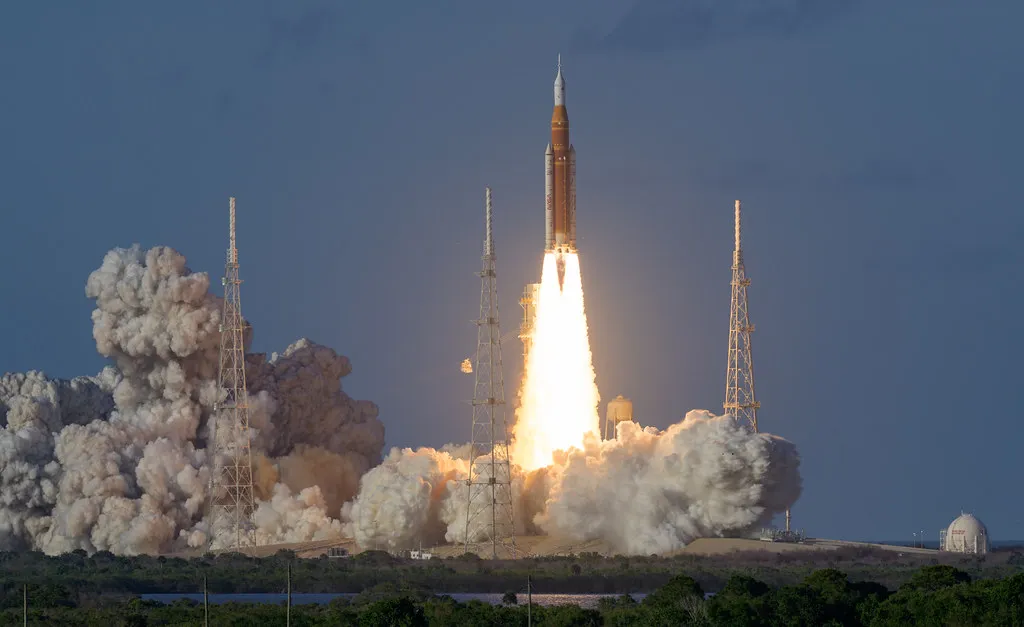
1. Physical force described with intensity language. "Violent explosive force," "massive plumes," and "billowing fire" are intensity descriptors that communicate the scale and energy of the event to the model. Neutral language like "a rocket launches with smoke" produces a much more subdued, underwhelming result. Match your language intensity to the energy of the scene you want.
2. Particle and atmospheric detail specified. "White smoke," "fire and flame jettisoning from the engines," and "shockwave ripples visible in the smoke clouds" are particle system instructions. Each one tells the model to render a specific physical phenomenon. The more atmospheric detail you describe, the richer and more layered the visual output becomes.
3. Camera performs a compound movement. "Dramatically pulls back and tilts upward tracking the ascent" is a two-axis camera instruction — simultaneous pull back and tilt up. This creates the feeling of the camera struggling to keep pace with the launch, which adds drama and realism. Simple single-axis movements feel mechanical; compound movements feel alive.
4. Temporal style applied selectively. "Slow motion" is applied to an explosive fast-moving event — which is exactly when slow motion is most effective. Applying slow motion to an already slow scene wastes the technique. Here it stretches the violence of the launch into something majestic and cinematic.
5. Image to Video amplifies what is already happening in the source photo. The source photograph already contained a rocket mid-launch with fire and smoke. The AI did not invent the scene — it continued and intensified it. This is the core power of Image to Video: the model uses your photo as the physical truth of the frame, then applies motion based on your prompt. The smoke was already billowing — the AI made it billow more. The fire was already burning — the AI made it roar. Your prompt directs the intensity and camera, the image provides the reality.
⚠️ Key insight: The best Image to Video results come from source photos that already contain implied motion — a person mid-gesture, an animal mid-action, a scene with natural energy. A photo that already suggests movement gives the AI a strong physical foundation to animate from, producing dramatically more realistic results than starting from a completely static image.
Prompting by Model: Kling, Hailuo & Seedance
Different AI video models on PulseMotionHub have different strengths. Understanding what each model excels at will help you choose the right one and write prompts that maximize its capabilities:
Kling v2.1 Standard & 2.5 Turbo — Best Value
Great for: portraits, people animation, general-purpose video. Responds well to detailed camera direction. Good at hair, fabric, and facial expressions.
Prompt style: Detailed but not overly complex. Focus on clear camera motion and subject action.
Kling 3.0 Pro — Best Quality
Great for: complex scenes, physics-heavy content, slow motion, wildlife, action. The most capable model for realistic motion physics. Worth the extra credit cost for hero content.
Prompt style: Can handle more complexity. Push it with multi-element scenes and demanding physics requirements.
Hailuo 2.3 MiniMax — Best for Cinematic Wide Shots
Great for: landscapes, establishing shots, cinematic atmosphere. Excels at wide-angle compositions and environmental storytelling.
Prompt style: Lean into environmental description. Describe the atmosphere, weather, and scale.
Hailuo Live — Best for Anime & Illustration
Great for: animated characters, illustrated portraits, stylized content. Purpose-built for non-photorealistic content.
Prompt style: Include anime style keywords — "Studio Ghibli, cel-shaded, vibrant colors, smooth animation"
Seedance 2.0 Fast — Premium Quality with Native Audio
Great for: highest quality output with built-in sound generation. Real-world physics, up to 1080p, ByteDance's most advanced model.
Prompt style: Write like a film director. Describe the sound environment too — "sound of rain, distant thunder, footsteps on wet pavement" — Seedance will generate matching audio.
10 Copy-Paste Prompt Templates
These are ready-to-use prompts you can paste directly into PulseMotionHub. Customize the subject details to match your image or concept:
Common Mistakes to Avoid
Even experienced creators make these prompting mistakes. Avoiding them will immediately improve your results:
❌ Mistake 1: Describing the image instead of the motion
For Image to Video, your uploaded image already shows what's in the frame. Don't re-describe it. Instead describe what should MOVE and how the camera should BEHAVE.
❌ Mistake 2: Using contradictory style terms
"Realistic anime photographic cartoon style" confuses the model. Pick one visual language and commit to it.
❌ Mistake 3: Ignoring camera direction entirely
A static camera almost always produces a less impressive result. Even "camera slowly pushes in slightly" makes a huge difference.
❌ Mistake 4: Overloading with too many subjects
AI video models struggle with many different elements moving independently. Keep your scene focused — one or two main subjects with clear action directions.
❌ Mistake 5: Not using the negative prompt
PulseMotionHub includes a Negative Prompt field on every generation tab. Use it to exclude common AI video problems: "blurry, low quality, watermark, distorted faces, bad anatomy, shaky camera, flickering"
Related Articles
- 60 AI video prompts you can copy and paste
- which AI video models generate native audio
- guide to turning a still image into AI video
- guide to generating images with FLUX before animating them
- complete guide to the Kling AI video model
Ready to create your first cinematic AI video?
Subscribe for $47/mo and get 90 credits every month, or buy credits pay-per-use with no subscription, to put these techniques to work right now. Cancel anytime. New customers get 20% off their first card payment automatically — no code needed.
⚡ Get Started →$47/mo · 90 credits · 10+ professional AI models
Have questions about prompting or a technique you'd like us to cover? Email us at support@pulsemotionhub.com — we read every message.